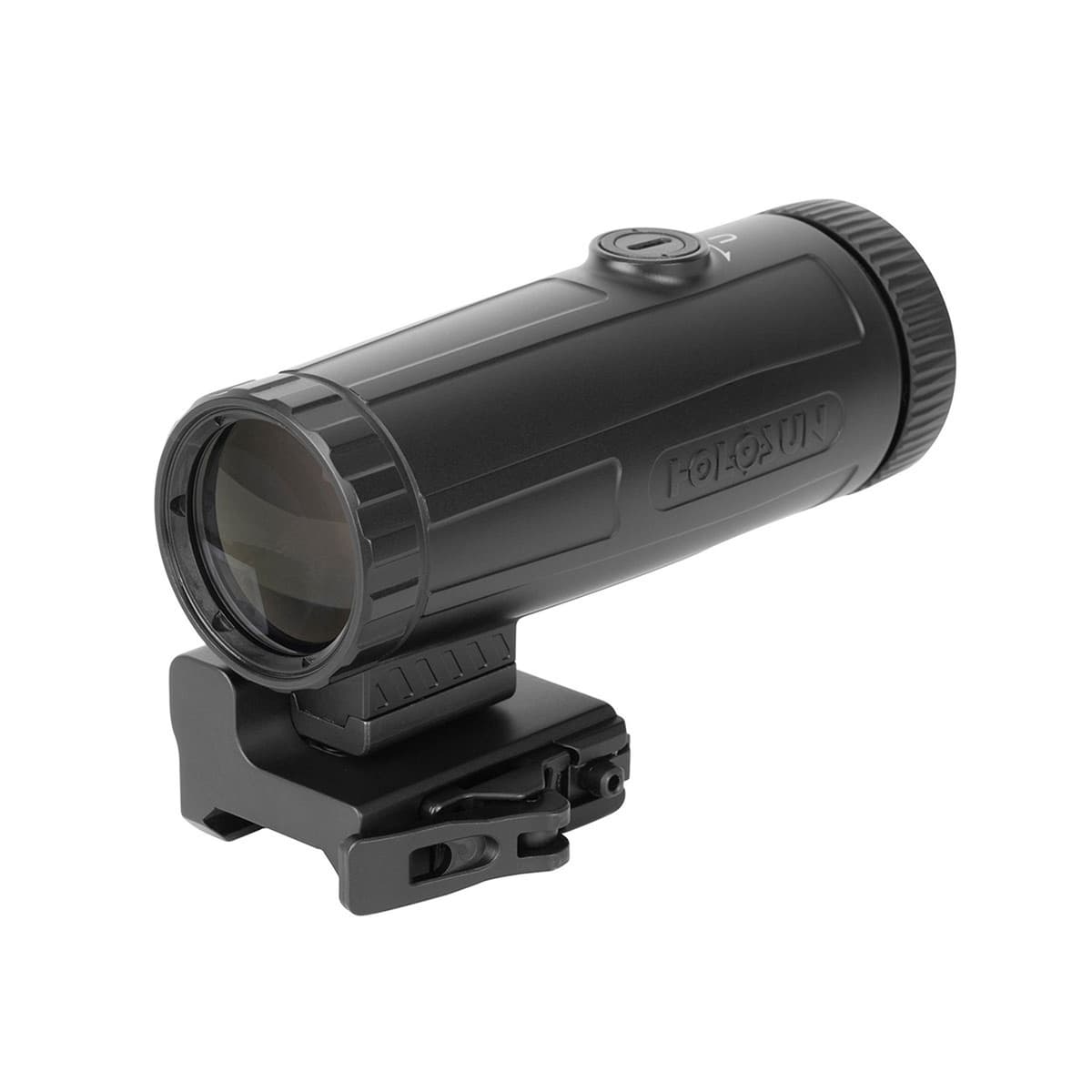
Holosun HM3X-MICRO Magnifier
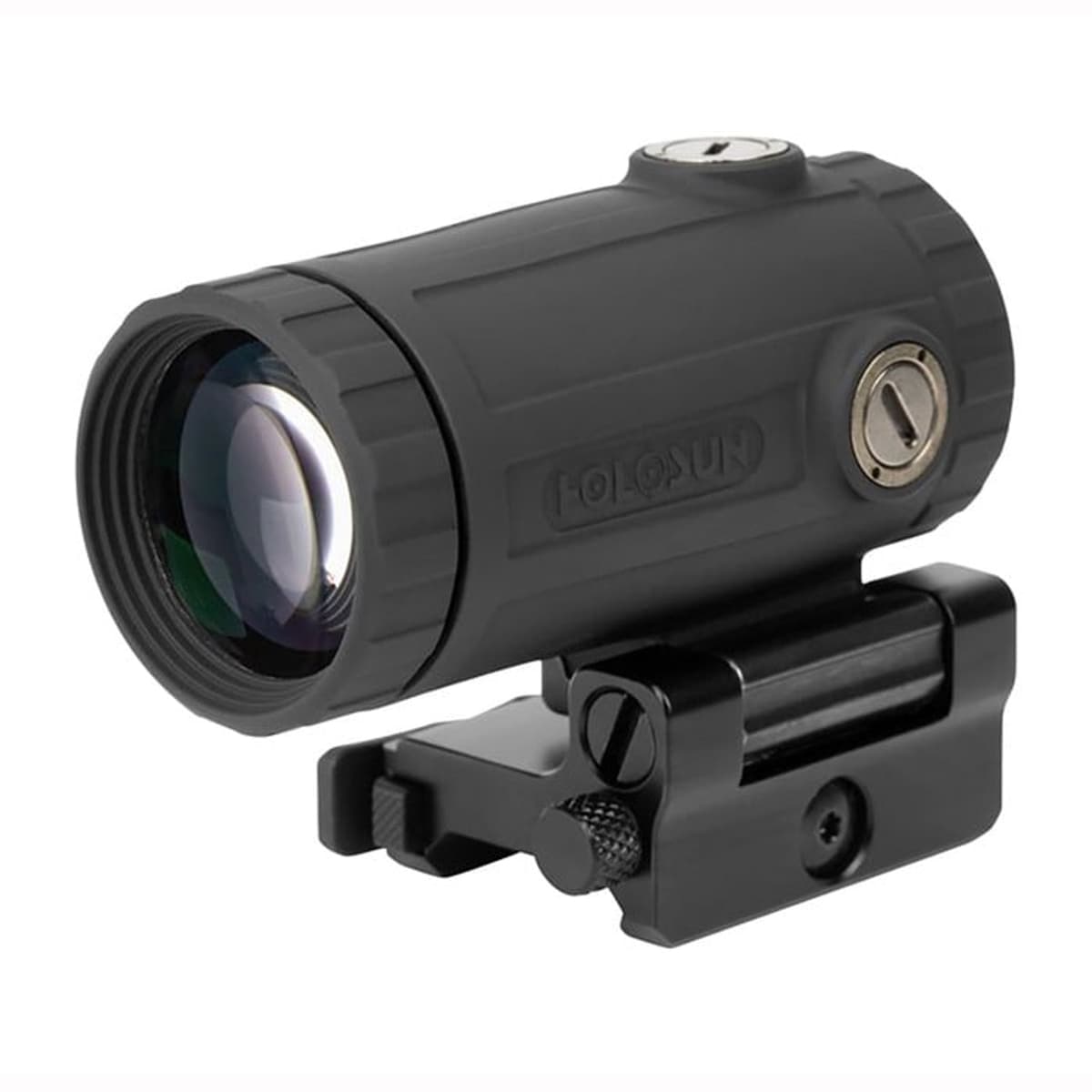
Compact 3x magnifier in a streamlined 8.47 oz package
- Price
- $271
- Weight
- 8.5 oz
- Brand
- Holosun
- Category
- Magnifiers
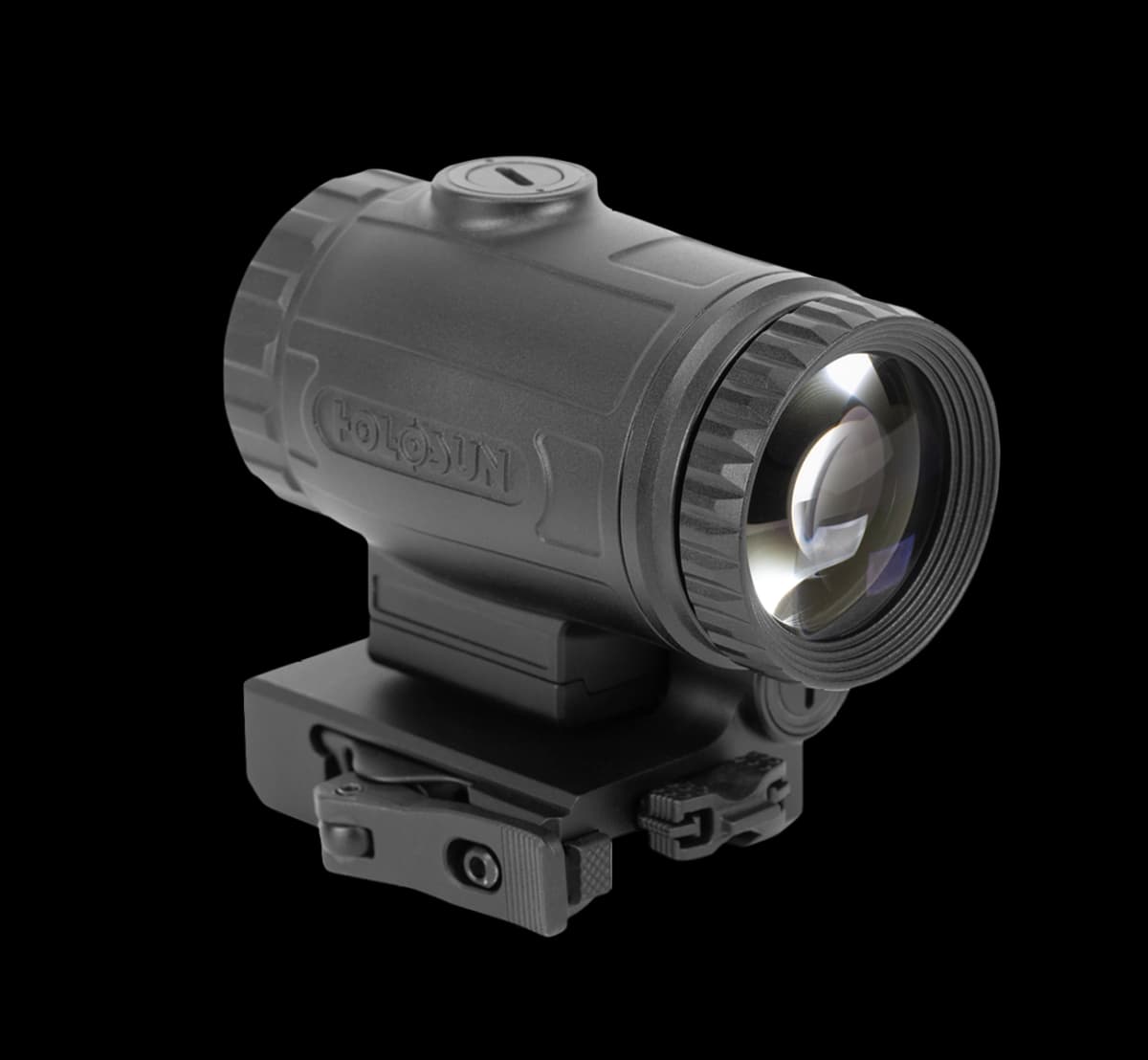
Features
- •3x magnification
- •8.47 oz lightweight
- •67mm eye relief
- •7° FOV
Capability Boosts
Recommended For
+3 more
Where to Buy
Compare current prices and availability from retailers we work with.
Some retailer data is older. Verify price and stock before buying.
Holosun HM3X Micro 3x Magnifier - HM3X-MICRO
Price History
90-day low $229.99 · at low nowMore magnifiers guides & articles
Guides

Overview
The Holosun HM3X-MICRO is the lightweight evolution of the HM3X line, debuting in 2026 to address feedback that the standard HM3X was too heavy for minimalist carbine builds. At 8.47 oz, it shaves 2+ oz off the standard HM3X and HM3XT while delivering the same 3x magnification, an unusually large 7° field of view, and a generous 67mm eye relief. For shooters running ultralight ARs, PCCs, and recce-style builds where every ounce matters, the HM3X-MICRO is the strongest 3x option in the Holosun lineup.
The 7° field of view matches Holosun's HM3X and HM3XT specs while cutting weight to 8.47 oz. The 67mm eye relief is slightly shorter than the 70mm listed for the full-size HM3X and HM3XT, but still generous for a compact magnifier. Construction is 7075-T6 aluminum with MAO finish, nitrogen purging, and IP67 water resistance, with the same flip-to-side ambidextrous QD mount and absolute/lower 1/3 spacer system as the rest of the HM3X family.
The HM3X-MICRO offers the most modern Holosun 3x magnifier design with the lightest housing in the line. For new builds, it is the strongest pick when weight matters; the HM3XT only makes sense for shooters who want titanium construction specifically. Note: this is a 2026 Q2 release, so availability may be limited at launch.
Key Features
- Lightweight 8.47 oz design
- Wide 7° field of view (largest in the HM3X family)
- 67mm eye relief for forgiving head placement
- Ambidextrous flip-to-side QD mount included
- Absolute and lower 1/3 co-witness compatibility (spacer included)
- ±3 diopter adjustment for individual eyesight tuning
- Nitrogen-purged optics with IP67 waterproofing
Pros
- +Lightest 3x magnifier in the Holosun lineup at 8.47 oz
- +Widest field of view in the HM3X family (7°)
- +Longest eye relief in the line (67mm) for flexible head placement
- +Flip mount and spacer included in the box
- +Cleaner optical design than the older standard HM3X
- +Better value than HM3XT for shooters not prioritizing titanium specifically
Cons
- −2026 Q2 release; long-term durability data not yet available
- −Aluminum housing lacks the corrosion resistance of titanium HM3XT
- −Still heavier than running unmagnified
- −$50 premium over the older standard HM3X
Setup & Operation
Step-by-step procedures for setting up, operating, and maintaining the Holosun HM3X-MICRO Magnifier.
Mount the HM3X-MICRO Behind Your Red Dot
The HM3X-MICRO ships on a Picatinny quick-detach mount, so there is no cross bolt to torque and no wrench to find. A spring-loaded safety lock holds the locking lever shut, and the lever itself does the clamping. Holosun publishes a recommended torque of 0.5 Nm for the QD mount, roughly 4.4 inch-pounds, and rates the mount's return to zero at better than plus or minus 2 MOA once it has been set.
Position matters more than anything else here. The magnifier goes behind the red dot on the same rail, and the default mount configuration puts the optical centerline at 1.41 inches, which is absolute co-witness height. The housing folds 90 degrees to the side when you want 1x, and the flip direction is convertible from left-folding to right-folding.
Holosun's own warning comes first: the weapon must be unloaded and all safeties engaged before the magnifier goes on or comes off.
- • Included T10 Torx tool
- • Cleared, unloaded firearm
- 01
Clear the firearm
Drop the magazine, lock the bolt back, and confirm the chamber is empty before the mount touches the rail. The manual makes an unloaded, safed weapon a precondition for mounting, dismounting, and maintenance alike.
- 02
Open the QD clamp
Depress the lever safety lock and swing the locking lever open. The safety lock is what keeps the lever from releasing on its own under recoil, so it has to be pressed before the lever will move.
- 03
Set the magnifier behind the sight
Pick a rail position behind your red dot and drop the mount onto the slots there. Eye relief is 67 mm, so slide it fore and aft until the full 7 degree field of view opens up from your normal cheek weld rather than settling for the first slot that fits.
- 04
Close the lever and check it snapped home
Close the locking lever and let it snap back into place under the safety lock. If the lever will not close under hand pressure, stop and set the tension instead of forcing it.
Never force the locking lever closed. A lever that needs a palm strike is over-tensioned, and the fix is the T10 Torx bolt, not more force.
Set the QD Lever Tension
A fresh HM3X-MICRO often arrives with the quick-detach lever either too loose to hold or too tight to close, and Holosun expects you to set it yourself. The target is specific: with the tension correct, you should be able to release the locking lever with a single finger.
The adjustment screw is a T10 Torx bolt, and it is fitted with an anti-rotation plate. That plate is the reason the order of operations is not optional.
- • Included T10 Torx tool
- 01
Release the locking lever first
Depress the safety lock and open the locking lever before you touch the Torx bolt. The bolt's anti-rotation plate is engaged while the lever is closed, and turning it in that state works against the plate.
- 02
Turn the T10 Torx bolt
Use the supplied T10 Torx tool on the QD Torx bolt. Tighten in small increments to add clamping force, loosen to reduce it, and stop the moment the bolt resists.
- 03
Test the one-finger release
Close the lever, then try to open it with one finger on the safety lock. Too stiff for one finger means back the bolt out; a lever that flops open means take it in.
Do not turn the Torx bolt or any other set screw further than resistance permits. Past that point you are driving against a mechanical stop, not adding clamp force.
Match Magnifier Height with the Included Spacer
Out of the box the HM3X-MICRO sits at 1.41 inches of centerline height, which is absolute co-witness on a flat-top AR. The included spacer raises it to 1.63 inches for lower 1/3 co-witness, and an extension adapter ships alongside it for rail positions that need more length behind the sight. Both install between the magnifier housing and the mount.
Get this right and the magnifier's optical axis lines up with the red dot's window, which is what puts the dot in the center of the magnified picture instead of near an edge.
- • Included T10 Torx tool
- • Included spacer and extension adapter
- • Cleared, unloaded firearm
- 01
Flip the magnifier to the side
Fold the housing 90 degrees out of the sight line. That exposes the two screws on the underside of the magnifier that hold it to the mount.
- 02
Remove the two underside screws
Back both screws out and separate the magnifier from the mount. Keep the original screws with the parts they came from, since the stack you are building determines which length goes back in.
- 03
Insert the spacer, the extension adapter, or both
Sandwich the spacer and the extension adapter between the magnifier and the mount. The spacer alone takes centerline height from 1.41 inches to 1.63 inches.
- 04
Reassemble with screws of the correct length
Reinstall the mount using screws long enough for the new stack height and tighten them down. Holosun's safety instruction is explicit that the threads must grip deep enough or the sight can come loose when the gun fires.
Screw length is the failure point when you add a spacer. Reusing the short factory screws on a taller stack leaves only a few threads engaged, and that is the condition Holosun warns can let the magnifier come off under recoil.
Center the Reticle with the Optical Axis Adjustment
The HM3X-MICRO has its own windage and elevation screws, and they do a different job than the ones on your red dot. The elevation adjustment sits on top of the magnifier and the windage adjustment on the right side. Turning them shifts the magnifier's optical axis so it agrees with the sight in front of it, which centers the dot in the magnified image.
Holosun's sequence is the part people skip: zero the reflex sight first, then center its reticle in the magnifier. The magnifier moves the whole picture, dot and target together, so aligning the axes is a viewing adjustment. The rifle keeps the zero the red dot already holds.
The adjustment tool is not a separate accessory you can lose in a range bag. It pulls out of the mount, and its flat end is what turns both screws.
- • Adjustment tool stored in the mount
- 01
Zero the red dot before you touch the magnifier
Confirm the reflex sight is zeroed on its own. Any correction you make to the magnifier afterward assumes the sight in front of it is already right.
- 02
Pull the adjustment tool from the mount
Draw the adjustment tool out of the mount body. The flat blade end is the one that fits the optical axis screws.
- 03
Correct elevation with the top screw
Turn the adjustment on top of the magnifier in or out to move the dot vertically within the magnified picture. Holosun does not publish a click value or a direction for these screws, so move a small amount, look through the optic, and repeat.
- 04
Correct windage with the right-side screw
Turn the adjustment on the right side of the housing the same way until the dot sits centered left to right. The finished result is a dot in the middle of the field rather than one crowding an edge.
If a screw stops turning, you have hit the adjustment limit. Holosun warns that over-rotation can damage the magnifier, so stop there. Running out of travel before the dot centers points at the mount height or rail position, not at a defective magnifier.
Set the Diopter Ring for Your Eye
The diopter ring on the eyepiece carries plus or minus 3 diopters of adjustment, and it focuses two things at once: the field of view through the magnifier and the reticle of the sight in front of it. Shooters who mount a magnifier and decide their dot looks smeared or starburst usually have an unset diopter, not a bad dot.
This is set to your eye, not to the rifle, so it has no bearing on zero and it has to be redone for anyone else who shoots the gun.
- 01
Get behind the magnifier in position
Flip the magnifier into line and build your normal cheek weld with the red dot lit. The 67 mm eye relief means the picture only fills out at the head position you actually shoot from.
- 02
Rotate the ring until the reticle sharpens
Turn the diopter ring on the eyepiece in either direction. The magnifier has plus or minus 3 diopters of range, enough to cover most uncorrected prescriptions without glasses.
- 03
Confirm the field is sharp too
Check that distant detail through the objective is crisp at the same setting the reticle is crisp. The ring focuses both, which is why one setting has to satisfy both.
The housing is nitrogen filled at 99.99 percent and sealed to IP67. Any attempt to open it destroys the fill and voids the warranty, so a magnifier that fogs internally is a service center item.
Detailed Specifications
- Magnification
- 3x
- Eye Relief
- 67mm
- Field of View
- 7°
- exitPupil
- 7.1mm
- diopterAdjustment
- ±3
- Mount Type
- Flip-to-side QD (ambidextrous)
- mountHeight
- 1.41 / 1.63 inches (spacer included)
- weight
- 8.47 oz
- dimensions
- 2.76 x 2.44 x 1.81 inches
- Material
- 7075-T6 aluminum with MAO finish
- Waterproof Rating
- IP67
- vibrationResistance
- 1000G
Video Reviews
Similar Products
Compatibility Tags
Build Your Custom Configuration
Add the Holosun HM3X-MICRO Magnifier to your build and see how it enhances your platform.